
APOB Registration for Your Warehouse: How Amazon and Flipkart Sellers Add a Godown to GST
Quick answer: APOB registration means adding an Additional Place of Business — a warehouse, godown, branch or fulfilment centre where you carry on business in a state — to your existing GST registration. If you store stock in a rented warehouse in the same state, add it through a core-field amendment on the GST portal, using an address proof plus a rent agreement and an owner's NOC. A warehouse in a different state needs its own GST registration instead.
General information, not tax advice. Portal steps, forms and document requirements change, and practice varies between states and officers. Confirm the position with your CA before filing, and treat the steps below as the shape of the process rather than a substitute for it.
Key takeaways
- APOB registration adds a location in the same state to your existing GSTIN. A warehouse in another state needs a separate registration, not an APOB.
- Adding it is a core-field amendment (form REG-14) on the GST portal; the rules give the officer 15 working days to approve or raise a query.
- Four documents do most of the work: an address proof for the premises, the rent agreement covering the period of use, an NOC from the owner, and the address typed exactly as it appears on the proof.
- The most common rejection is not a missing paper — it is a mismatch between the address on the bill and the address in the application.
- Lozy hands over the facility's document pack in your name, the exact address string to paste, and help if a query comes — the filing stays with you and your CA.
Every few weeks we get the same call. The stock has reached the warehouse, the transporter's e-way bill quotes one address, the marketplace account quotes another, and the shipment cannot be received. Nine times out of ten the warehouse was never added to the seller's GST registration — and the APOB entry is the step that was skipped. If you sell on Amazon, Flipkart, Meesho, a quick-commerce platform or your own storefront and keep stock in a rented facility, the APOB entry is what makes the movement of those goods legal and documented.
This guide explains what an APOB is, when a warehouse has to be declared, the documents that get an application approved, the portal steps in order, what a rejection looks like and how to answer it. It also sets out exactly what Lozy provides so the filing is a form-filling exercise rather than a chase, and where the limit of our role sits.
What APOB means, and how it differs from PPOB
Your GST registration carries two kinds of address. The principal place of business is the one printed on your certificate. Every other location you operate from in that state — a godown, a branch, a fulfilment centre, an office where you keep records — is an additional place of business under the same GSTIN.
| Term | What it means | Example |
|---|---|---|
| PPOB — Principal Place of Business | The main location of your business in a state, printed on your GST certificate | Your registered office in Lajpat Nagar |
| APOB — Additional Place of Business | Any other location in the same state where you store goods, supply or receive goods or services, or keep records | Your rented warehouse in Okhla or Mundka |
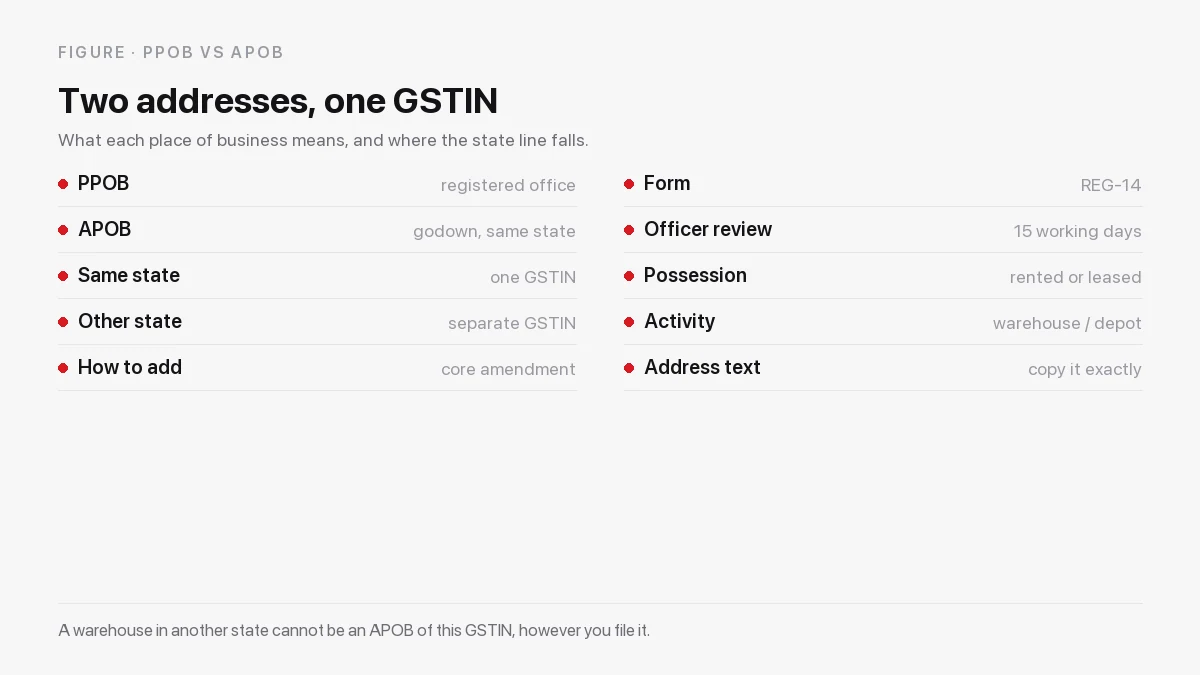
One GSTIN per state, many APOBs inside it
A GSTIN is state-specific, so the question "can I add this warehouse?" is really two questions. If the warehouse is in the same state as your GSTIN, yes — add it as an APOB, and you can have several under one registration. If it is in another state, no: you need a separate registration in that state, with its own principal place of business, and then that state's warehouse becomes an APOB of it. No amount of portal work turns a Haryana godown into an APOB of a Delhi GSTIN.
The practical consequence for an online seller is that expanding to a second state is a registration project, not an amendment. Budget the time for it before you commit to a facility, because the goods cannot legally move into an unregistered state's warehouse.
When APOB registration is required
Add the warehouse as an APOB if you do any of the following from that location:
- Store your own stock there. Even if nothing else happens at the site, the goods are part of your business and the location is a place of business.
- Dispatch orders or issue invoices from it. The address on the invoice should be a declared address.
- Receive inward stock from suppliers there. This is the case that catches most sellers first, because the inward movement is what gets questioned.
- Use a marketplace fulfilment centre in that state. Where the platform operates the facility, the arrangement differs by platform; where you hold stock in your own name inside a third-party facility, the declaration is yours to make.
The test is not whether you own the building. It is whether the location is a place where your business is carried on. Rented premises qualify, and the paperwork simply has to show who let the space and on what terms.
Adding a warehouse: APOB, or a fresh registration?
The decision takes one question: is the facility in the same state as the GSTIN you already hold? If yes, it is an amendment to the registration you hold. If no, it is a fresh registration in that state, and the warehouse then becomes an APOB of the new one.
| Situation | What you file | What changes |
|---|---|---|
| New godown in the same state as your GSTIN | Core-field amendment (REG-14) | One address added to an existing registration |
| New godown in a different state | Fresh registration in that state | A new GSTIN, a new principal place of business, then the godown as its APOB |
| Moving out of a godown | Core-field amendment (REG-14) | The address removed from the registration |
| Changing the landlord or the area, same address | Usually an amendment | The document set, not the address |
Most sellers underestimate the second row. A fresh registration in a new state involves its own application, its own verification and its own compliance calendar, and it cannot be rushed by goodwill with the warehouse. If a marketplace is asking you to stock in a second state, start that registration before you sign the facility, not after the stock is booked.
Documents for APOB registration
The list below is what officers usually ask for on rented premises. It is not a fixed national list — the portal, the state and the officer's practice all move — so treat it as the pack to assemble rather than a guarantee.
| Document | Notes |
|---|---|
| Proof of address of the premises | Latest electricity bill, property tax receipt or a municipal document in the owner's name |
| Rent agreement or lease deed | If you rent the space; it should cover the period you actually intend to use it |
| Consent letter or NOC from the owner | Required where there is no rent agreement, or where the space is shared or managed |
| Owner's identity proof | Sometimes asked for, especially where the NOC substitutes for an agreement |
| Photograph of the premises | Sometimes asked for; a clear photo showing the address board helps |
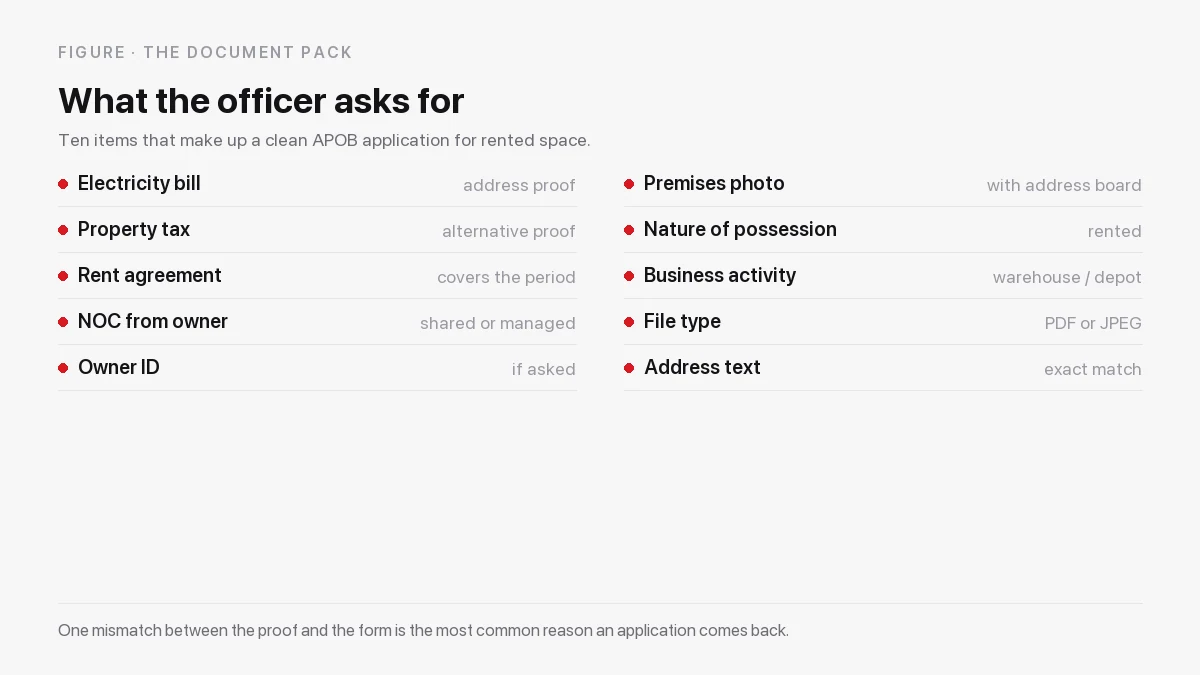
If you rent from a managed warehousing provider, ask for three things before you file: an address proof for the facility, an agreement or authorisation in your company's name covering the period of use, and an NOC from the owner. Those three documents decide whether the amendment is approved on the first attempt. Our guide to the warehouse rent agreement format sets out what such an agreement should contain, including the term and the premises description that an officer will read.
APOB registration on the GST portal, step by step
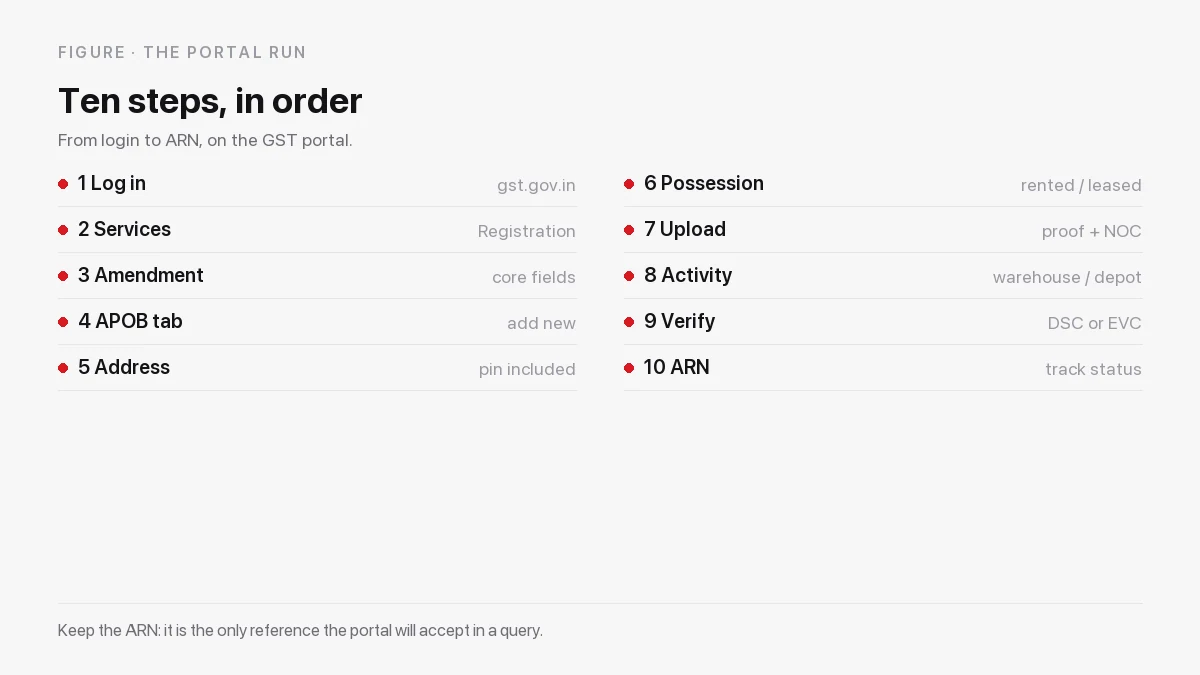
The sequence below is the shape of the process for adding an APOB as a core-field amendment. Menu labels shift occasionally, so if a label differs, follow the same order of operations rather than hunting for the exact wording.
- Log in at the GST portal with your credentials.
- Open Services → Registration → Amendment of Registration (Core Fields).
- Go to the Additional Places of Business tab and choose Add New.
- Enter the full address with the PIN code exactly as it appears on the address proof. This is the step that decides most outcomes.
- Select the nature of possession — rented, leased, consent, shared, and so on. For a rented godown this is rented or leased, not owned.
- Upload the address proof and the rent agreement or the NOC, within the portal's file type and size limits.
- Select the nature of business activity at this location — warehouse or depot is the usual choice for storage.
- State the reason for amendment and the date of change. Keep it factual: "addition of additional place of business for storage of goods".
- Verify and submit with DSC or EVC after ticking the declaration.
- Note the ARN and track the status under Track Application Status until it is approved or a query arrives.
The official portal is the only place to file: services.gst.gov.in. The GST portal's own help section, gst.gov.in/help/faqs, is worth reading for the current form behaviour, and tutorial.gst.gov.in carries screen-level walkthroughs for amendments.
How long the approval takes
An APOB addition is a core-field amendment, so an officer reviews it rather than the system auto-approving it. Rule 19 of the CGST Rules requires the officer to dispose of an amendment application within 15 working days of its submission, which in practice means either an approval, a query, or occasionally a request for physical verification.
A query is normal and is not a rejection. It usually asks for a clearer address proof, a legible agreement, or confirmation of the nature of possession. Reply through the portal against the same ARN with the document that was asked for, and keep the reply short: the officer is matching the address, not reading your business plan.
Plan the calendar around the timeline rather than the hope. If your stock is arriving in ten days and the amendment has not been filed, the arrival is the problem, not the officer.
A realistic sequence for a new warehouse
Working backwards from your first inbound delivery, the order that avoids a stuck shipment looks like this.
- Before you sign: ask the facility for its document pack — address proof, NOC, and the exact address string. If it cannot produce them, the filing will stall later.
- On signing: get the agreement in the legal name that matches your GSTIN, covering the period you will actually use the space.
- Same week: file the core-field amendment. The clock only starts when the portal accepts the application and issues an ARN.
- While you wait: prepare the seller-account update, the GSTIN board and the invoice template that will quote the new address.
- On approval: update the marketplace profiles, then release stock. If the approval is still pending when the truck arrives, hold the inbound rather than moving goods into an undeclared address.
Four to six weeks of planning is usually enough for a same-state APOB done cleanly, once the documents exist. The variable is never the portal; it is how long a landlord takes to hand over a bill and a signature.
Who signs the application, and who files it
The application is filed by the taxpayer, using the credentials of the GSTIN and the digital signature or electronic verification code of an authorised signatory. In a proprietorship that is the proprietor; in a company or LLP it is a person named as authorised signatory in the registration, and the DSC must be the one recorded against that name.
Three practical points come out of that, and each one costs a week when it is discovered late.
The name on the agreement must be the name on the registration. If the warehouse agreement is in the name of a group company, a partner or an individual director, the officer has to reconcile two different legal persons. Ask for the agreement in the exact name and GSTIN of the entity filing the amendment, and if the landlord has already issued it to another name, get it reissued before you file.
The authorised signatory has to be reachable. Queries sit on the portal, and the ARN is not much use if the person who can answer is on leave. Keep the login and the e-signature with whoever owns the compliance calendar.
Your CA files; the facility supplies. Most sellers ask their chartered accountant to make the amendment, because the same person handles the returns and the input credit that follows. The warehouse's job is to make sure the document pack is complete, the address matches and the papers are in the right name. Lozy does that part and hands it to whoever files on your side.
APOB registration mistakes that block shipments
- Starting operations before approval. Invoices and e-way bills should quote a declared address, so goods moving into an unapproved warehouse create a mismatch.
- Filing an out-of-state warehouse as an APOB. It needs a separate registration in that state.
- Selecting the wrong nature of possession. Marking a rented space as owned invites a query that costs a fortnight.
- An expired agreement. If the rent agreement has lapsed, the officer may refuse it as proof of present possession.
- A lapsed or mismatched NOC. An NOC written for a different entity, or for a period that has passed, is not proof of anything.
- Not updating the marketplace account. Amazon, Flipkart and the quick-commerce platforms hold the warehouse address on your seller profile, and it should match the GST record.
- Forgetting to remove an old address. When you leave a warehouse, amend the registration to drop it.
How Lozy makes APOB registration easy
Most of the pain in an APOB filing is not the portal. It is chasing a landlord for an electricity bill, discovering the agreement is in the broker's name, and then finding that the address on the bill reads differently from the address you typed. That is the part a managed facility can remove.
The document pack, in your name
When you store with Lozy, the paperwork you need for GST registration is issued to you rather than left for you to assemble. That means a written agreement in your company's name covering the period of use, an address proof for the specific facility, and the owner's consent or NOC where the space is shared or managed. Ask our team for the APOB pack at the same time you ask for the quotation, because the pack is prepared against the facility, not against the city.
The address string that actually gets approved
The single biggest cause of rejection we see is a mismatch: "Plot 12, Khasra 45" on the electricity bill, "Plot No. 12, Near the temple" in the application. Lozy gives you the facility's address exactly as it appears on the address proof, with the PIN code and the same punctuation, so the application and the proof are character-for-character identical. Paste it; do not retype it.
One facility at a time, with its own papers
If you store in more than one city, each state needs its own registration before the local warehouse can be an APOB. We issue the document pack per facility, so a second city does not send you back to the first one's paperwork. The locations page lists the facilities by city, and the team can tell you which ones currently have the pack ready.
When the officer raises a query
If the department asks for a clarification — a clearer bill, a signature, a fresh NOC, confirmation of the area you occupy — send the query to our team and we will provide the document or the confirmation that answers it, in the name that matches the application. We cannot answer the query on your behalf, but we can supply the missing paper quickly, which is usually the whole of the delay.
Invoices that match the registration
Your monthly Lozy invoice carries GST and the facility address, so the storage charge you claim as input credit points at the same place of business that appears in your registration. A warehouse receipt and a tax invoice quoting different addresses is exactly the kind of mismatch that turns a routine credit claim into a correspondence.
What Lozy provides: a written agreement in your name, the facility's address proof, an owner consent or NOC, the exact address string for the portal, the pack per facility for multi-city storage, and help with documents if a query is raised.
What stays with you: the filing itself, the GSTIN it goes under, your CA's view on the treatment, and the marketplace account updates. We are a warehousing provider, not a tax practitioner, and we say so plainly.
Ask for the APOB pack: Phone +91 93547 12345 | care@lozy.in | www.lozy.in
APOB registration for Amazon, Flipkart and quick-commerce sellers
The GST record and the marketplace record are separate systems, and both need the same address. Once the amendment is approved, update the warehouse or pickup address on your seller account so the picklist, the e-way bill and the invoice all quote it. Where you use a platform's own fulfilment centre, follow that platform's process for declaring the FC — the platform will have its own registration and its own requirement from you.
Keep the proof of the update too. In a dispute about a shipment that was refused, the screenshot of a seller profile that matches the GST certificate is the fastest way to end the conversation.
Quick-commerce is the case sellers ask about most this year. Dark stores and platform-run micro-fulfilment points usually belong to the platform, which holds its own registration for each site, while the seller is expected to keep a declared place of business for the stock it owns. Where the seller operates its own dark store, that site is its own APOB and needs the same document pack as any godown — address proof, agreement or consent, and the address exactly as printed. Ask the platform what it expects from the seller before you sign a store, because the requirement differs between them and it changes with the contract.
After approval: invoices, board, records
Three habits keep the registration clean once it is approved. First, display the registration certificate at the place of business and put up the GSTIN board where state rules require it — the requirement varies by state, so confirm the local rule. Second, issue invoices quoting the declared address, and keep the numbering sequence intact across all places of business. Third, remove a location from the registration when you leave it, so a future e-way bill does not point at a godown you no longer hold.
Two records are worth keeping outside the portal. The first is a small file per facility: the approved registration extract showing the address, the agreement, the NOC, and the address proof it was approved against. When a future officer, auditor or marketplace asks why a shipment quoted that address, the file answers in one page. The second is the movement record — the inward and outward entries that show the goods actually arrived and left, which is what turns a declared address into a defensible one.
Storage costs themselves have their own GST treatment, and input credit depends on the invoice being correct — the pricing page shows how Lozy bills, monthly and with GST.
Where APOB fits in your e-commerce setup
APOB is one part of selling from a warehouse, and it is the part that comes before the stock moves. The rest of the picture is in our guides on storage for Amazon and Flipkart sellers, e-commerce warehousing and warehousing for e-commerce brands. If you are still deciding how to start, our note on the warehousing companies to compare sets out the provider models side by side, and the on-demand warehousing guide explains the monthly model that most first-time sellers start with.
For pick, pack and dispatch handled by the facility, the fulfilment warehouse service and the e-commerce warehousing page cover what is included. If your requirement is small, the small warehouse guide covers the under-1,000 sq ft case, and smart warehousing explains the stock record you will be receiving.
Store with APOB-ready documentation
Planning to stock a warehouse for your online store? Tell us the city and the space, and we will share the APOB document pack with the quotation, so the registration and the stock arrive together. See e-commerce warehousing, current pricing or talk to the team.
Phone +91 93547 12345 | care@lozy.in | www.lozy.in
Need warehousing or storage in India?
Request a free, tailored quote in under 2 minutes — free pickup, no lock-in.